
Friday, January 6, 2012

The Gatekeeper


Click to see these at full size ... 1000 pixels high.

The other day I was looking through some fantasy calendars ... actually, the 2011 calendars that have just come down off the walls and and are being consigned to the cupboard. I was thinking to myself, "I need to sit down and do something gloriously complex, filled with textures and -- and --

Dragons. Now, Dave is the one who works with dragons all he time. He loves his dragons. I've been after him to do a guest post on my blog here about them, but so far, no joy.  His stuff is very, very different from my work -- refreshingly offbeat, surprisingly "left field," full of potential ... and I wish he'd do more of it.

This critter here isn't actually a dragon at all. The model is called the Dinokonda, and you can do a lot with it. In fact, the original Dinokonda is green, but I wanted him to be red and gold, so ... job #1: get in there and make a whole new skinmap for him. Then change out all the textures on his horns and teeth ... and give him blue eyes.

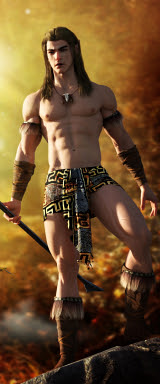
Next? The hero. Create a dude who looks like he just walked right out of a fantasy calendar! No problem. Then ... paint the backdrops. Import a standing set ... I used DM's Circular Shrine, but even Danie and Maforno, the designers, would have to look twice to recognize this, because every texture is changed, every map, the lot. The shrine has become The Gate, and the Dinokonda is the Gatekeeper -- keeping people out, or keeping them in? Good question! The scenes were raytraced, and then shipped into Photoshop to be heavily overpainted. I'm very pleased with the way these turned out.

Meanwhile, I took an hour or so out and installed DAZ Studio 4, took it for a test drive...

Well, I'm grateful for two things: 1) The Uninstall button. 2) I didn't pay money for this.

To be fair to it, I was very impressed with the Genesis mesh -- this is the new fundamental "substance" underlying the human figures you work with in Studio 4. You can indeed bend and stretch the figure, and his/her joints don't crumple and buckle. However, after I was done posing the Genesis figure, I rotated it to see how it looked from the other side ... it left its eyeballs and teeth floating in space!! It did this twice, on two restarts of the program. I suspect a bug in the works --

And the Genesis mesh is the only thing that Studio 4 does, that's a useful "plus" over Studio 3. The other new features are very subtle -- for instance, a new kind of light, the linear point light. These features are likely quite useful, but --

They're heavily outweighed by the downsides. And there are several. First, there's the interface. The old interface was dead simple, understated, positively professional in its linear appearance. The Studio 4 interface is loud and "in your face." Dave took one look and said "They've cartoonified it." This is pretty accurate. The new interface is pure Tom and Jerry in its huge-icon-driven approach. Gods help the people who're trying to use this on a laptop with a small(ish) screen. The enormous panels full of whopping great icons and cascading graphical menus fill up my 22" monitor! And the only reason my system is handling all this is because it would just about run the space program ... if you've been following this blog at all, you'll know that this new machine was under the Christmas tree a couple of weeks ago, and since then -- well, my art has exploded. My old system would have turned belly-up soon after starting Studio 4.

Suffice to say, I don't have much time for the new interface. I could get used to it, if I were forced to, but it's a visual clutter ... added to which, if you're used to Studio 3, you spend your time hunting high and low for where they've put the tools. Some tools seem to have utterly vanished, and doing things which used to be simple is now a big issue. It's very confusing to one who's used to the old studio ... so much so that you would really have to have a solid reason for climbing this learning curve. (If you come to Studio 4 brand new, never having  used the simple old interface, the story will be different, I guess. It's what you're used to!)

Next thing that's problematical: if you're "upgrading" to 3 from 4, it stands to reason that you have a large library of 3D models and resources already installed, yes? I have 23 GIGS of these, ready installed and at my fingertips. Studio 4 cannot seem to get a-hold of them. Any of them. They would have to be reinstalled to suit the new program's directory structure ... in other words, I'd spend days installing models. Urk. Studio 4 would have to be the bees' knees to inspire me to do this.

Next problem: I have a lot of money invested in wigs and costumes for Michael 4 and Victoria 4.2 ... none of them fit the Genesis model, without me dropping another $75 to buy the Genesis Morphs pack, plus the Generation X plugin, which drops the Michael and Victoria morphs right onto Genesis. With them in place everything ought to fit, and the figures should bend and stretch without buckling. But I'm not, at least not right now, in the mood to spend the bucks, because Studio 4 doesn't offer enough incentive to make it a "must have, must do" thing.

One reason to get into it would be if Studio 4 were stuffed full of things that Studio 3 doesn't do ... but the fact is, it's not. Once you get past the Daffy Duck interface, and start dropping down menus, the infrastructure -- what the program does, and how it does it -- is sooooo familiar. All the old functions are there; and precious few new ones, so that you're left with the question: I have to learn this whole Bugs Bunny routine, just to keep on doing what I was doing yesterday, without any problem whatsoever --? Hmmm.

The good news is, Studio 4 installs separately from Studio 3 so that, theoretically, you could run them back to back and make the transition gradually (the way I merged over from Micrografx to Photoshop, without much real pain at all). In practice, it's not such good news. Studio 4 hijacks your file association, and nothing, repeat nothing you can do will change it back. I went through the file association process three times, with three restarts, to be sure of this. Worse yet, shutting down Studio 4 when it has fired itself up without being wanted, makes the program crash. It hangs up and take some time to get out of.

Bottom line: I think the program still has a swarm of bugs; the pluses don't warrant the awful new interface, or the time it would take to reinstall everything, or the money I'd need to spend on the plugins, just to end up right back in the same place ... and it's damned annoying to have your file association irrevocably hijacked.

For myself ... I'm probably going to stick with Studio 3 and wait for Studio 5, which will almost certainly come around in a big circle and fix a lot of the things people didn't like about 4. If it doesn't ... well, obviously, eventually we'll all have to make the change to the new "cartoonified" interface, or else change to another program! Now I understand why people on various forums are saying, "I would become a Poser user before I'll change to Studio 4 ... and I've been a DAZaholic since Version 1.2!"

Well, I'd been curious -- and now the questions have been answered. I do like the Genesis mesh! But that's the only thing I like. The rest is a rather large nuisance, so I hit the "uninstall" about 90 minutes after I'd installed it. Back to Studio 3 -- and loving it.

Jade, 6 January 

Wednesday, January 4, 2012

CG art: Warriors of the Apocalypse


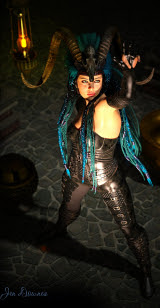
Here's something new: the armor on the Millennium Horse is a knockout.  Then I thought, why not take the Raven character, with the black raven's wings, and put the two together in a Gothic setting -- and have the winged avenger in armor too?

The horse armor is known as the Dragon Lord armor -- why, I have no idea, because it doesn't involve Michael 4 or the Millennium Dragon. But it's a cool name. To get it to look like this, I cranked the bump map settings out to max, and then added a "positive" value of 2. This gets all the ridges and delves and engraving to stand up. Looks marvelous.

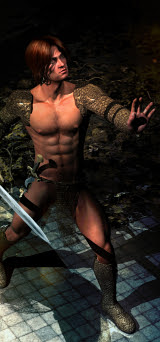
The armor on Michael 4 is Powerage's Supreme Armor -- you've actually seen it before, but not in eons. Again, I cranked the bump map settings, and played with the specularity (ie., the glossiness of the surfaces) and the reflectivity.

The set is the Cloisters standing set, from DAZ (both the armor sets are from DAZ, too). You've also seen this, but I think it's been about a year since I used it! Golly, how time flies. The backdrop is a Bryce sky with lightning added in using Photoshop brushes...

The wings on the winged warrior are the Feathered Wings (ditto the market source), and again I did a lot of work on them to bring them up with this effect. I rather like the "mystic avenger" character ... making him anything but European or Caucasian, also adds a dimension.

There's about six lights on the warhorse scene, and about ten lights on the cloister scene ... and both of these renders were raytraced and then heavily painted in Photoshop ... but the painting is so subtle, you're not going to actually see it. I was basically painting with "inks," to bring up the contrast, shine, reflection, etc., in the armor. When you do this, you're using the brushes that lighten and darken parts of the image ... if you pick your airbrush setting just right, and load it up with the right color of ink, you can have it darken the dark tones and leave the light tones alone. Then you can do the reverse. Working across the same area of the canvas multiple times, you can get fantastic effects with this. It's also great practice for me, getting my brain wired up to use a really good mouse pen...

Have been looking at the lately, and drooling. Have you ever visited the Wacom site? Hmmm. Well, the one everyone talks about is Wacom Bamboo -- and this is the one I knew, myself, a couple of weeks ago. However, if you're dead serious about this, you'd be looking at their other range, the Intuos4. They're fantastic. They're expensive. Like I said, am drooling, but I don't know if I can afford the Intuos4! Will more likely stick with the Bamboo range -- and they really are the next generation up from graphics tablets like Genius, Kanvus and Digitizer. Right now I'm using a strange hybrid setup -- Digitizer tablet that has to be 6 years old, and a new Kanvus stylus -- but the Kanvus drivers won't work, for some reason, even with the Kanvus tablet ... so the tablet went back in the box, I pulled out the old Digitizer one, and fell back on the Windows plug-'n-play drivers. Hey presto. Perhaps not the ideal solution, but hey, it works.

The other thing I downloaded from DAZ, when I got the Feathered Wings and the Dragon Lord horse armor was Studio 4 -- free on the day; I understand it's usually fifty bucks or so. Have been dying to get the chance to load this up and play, but (whinge; whine; whimper) there's been work to be done, and there still is! Gimme a few days to get things straightened out, and then I'll be back, and tell you what I think.

Jade, 5 January

Tuesday, January 3, 2012

CG fantasy and ... check out this 3D water!


Happily 3D modeling in DAZ and Bryce, and painting in Photoshop ... having a ball doing the things I always imagined, but couldn't do before I opened the box that magically appeared under the Christmas tree. (We don't have a chimney, because we don't have a fireplace. I guess Santa must have teleported in. In fact, a guy of that girth must be teleporting down chimneys. Right?)

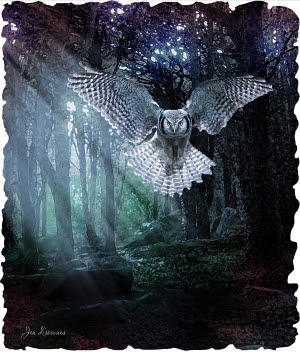
Above: the Raven again, and some very cool painting effects. Also very simple. But sometimes the simple things are the ones that work out the best. Now for something that was faaaaar from simple!

You might assume this was done in Bryce:


Bryce landscape. Is it? Nope. Well ... I guess you could say it's a bit of a hybrid, becase that is a Bryce sky I used as the backdrop, and the ground, the "terrain" was created in Bryce, before being exported as an OBJ Object. But the scene was built and rendered in DAZ Studio 3. I've uploaded it at full size, and I urge you to click on it, see the details -- and in particular, the water! But --

I also know that these pleas often fall on deaf ears, so here ... here's a swatch out of the picture, at full size, so you can at the very least see that water:


Yep, all done in DAZ, not Bryce, with just a tiny bit of overpainting in Photoshop (birds in the sky; grasses on the skyline). Any Photoshop painting on the water? Nope. So -- how was it done?

First, I created the "terrain" in Bryce, and exported it as an OBJ. This was imported into DAZ, and it was given a diffuse map -- a huuuuuge picture of grassy ground -- and an immense displacement map to ruck up the surface into loads of teeny tiny detail that looks like grass or groundcover plants. The terrain has mounds and hollows ... so I created a "primitive," a simple plane, which became the surface of the water. This was jiggled into place in the hollows ... I put an image of the surface of a lake on it; and an opacity map which told it to be transparent in wave-shaped patches; and a displacement map that told it to assume the shape of waves; then I told it to be glossy, or shiny, and highly reflective. I set rocks and boulders under the surface, to show through, then went along planting ferns and grasses and shrubs along the water's edge. The lights were a challenge: full daylight, very bright, but starting to get along through afternoon. The weather: fine, with a high haze. Several dozen test renders ... then set it to raytrace. And even with the new computer, it took about an hour and a half. On the old computer? It would have been a complete system crash before I even got the plants into place!

The good news: the new machine is powerful enough to render all that in the background, while I go on and do something else in the foreground:


Hand painted from a digitally-derived sketch ... I was trying to get a watercolor effect, and I'm not a hundred miles away from it. There's so many different ways to do this kind of work -- what I'm trying to do now is to get my brain wired up for freehand work with the mouse pen. Don't want to lay down some serious cash for a good one (Wacom) before the brain can handle it. So right now, I have an old Digitizer pad with a new Kanvus pen, running on the generic, plug-and-play drivers from Windows 7 ... you might not believe it, but it actually works, quite well enough for me to paint up a storm and get the brain wired up for doing this before I head off to Wacom's website and spend some silly money. 

I really am having a blast with art ... and I hope you're enjoying the results! Thanks for visiting, and watch out for a lot more, and some very new things, now that the capability is sitting on the desktop. (Thank you, thank you, once again, to my husband, who knew exactly what to put under the Christmas tree ... and he didn't have to squish down any chimneys to do it!)

Jade, 3 January ... 2012


Sunday, January 1, 2012

Fantasy landscapes and raven's wings ... Bryce and Vue


Happy New Year ... it's January 1 on this side of the dateline, and I continue to relish the opportunity to do anything except work ... time to indulge in art for its own sake! The two pieces above were my inspiration today ... please do click to see them at full size -- especially the winged hunk...

One of the books I got for Christmas was the art book Welcome to my Worlds, featuring the work of Canadian artist Rob Alexander. Somewhere in one of the prefaces is an observation that Alexander's paintings tell stories, and this struck a chord with me. I realized that this is exactly what I've wanted to do with artwork ... tell a story. Or make people's imagination take off when they look at a piece...

The top piece, today, I call The Raven. If it were a book cover (which it isn't ... there's no such book), the novel would be called Evermore, Quoth the Raven, deliberately mis-quoting a line in Edgar Allan Poe's famous work. The thing is, I have absolutely no idea what the story would be ... but I'll just bet your imagination fills with ideas when you see this guy -- especially at full-size. You have to check out the detail in this piece...  

Wow. Seriously. That's one of my characters -- in other words, face and body morph by me. He's wearing the Jackson skinmap, the Yannis Rasta Dreadlocks --and something I just got. The Feathered Wings, which I picked up on sale from DAZ just yesterday.

If you view the whole thing at full size, please do notice the buildings in the background. Not a backdrop! This time around, with the new computer, I'm able to actually bring in a whole city's worth of buildings and just ... park them there. I lit the windows of the mansion, which makes for a "human" touch, which counterpoints the other-world, more-than-human nature of the figure. The piece was raytraced (four and a half minutes!!) and then quite heavily painted in Photoshop.

I got some other goodies at DAZ, which I'll be sharing tomorrow, or at least very soon. I'd gone there to download (!) DAZ Studio 4, which is free at this moment (a special offer; usually fifty bucks). Now that I have the super-fast 64-bit system, I can look at Studio 4 ... but I also know that the jury is out on how good it is -- and, in fact, on how useful the Genesis figures actually are. Hmmm. I'll know more about this when I've had the chance to play with it, in coming days and weeks.

The second piece today is a real storybook landscape in Bryce 7 Pro. I wanted something that conveyed the fairytale fantasy genre, and I'm very pleased with this one. This time around, having the render power, I should be able to make sense of Bryce. At last!

But while I was setting off to feel my way through the interface for the first time in, I admit, months, I remembered that a year or more ago I was playing with another program called Vue. At the time, I was picking my way through the top layers of Vue 7, and the computer was struggling with it, which is why I never went much further...

So I wondered, naturally enough,   "Hmm, how does Vue run on this new system?"

The answer: like greased lighting, but.

And it's a monumental but. The software will not run properly without being online ... and my new machine has no modem. It is not likely to ever have a modem. It runs 100% in quarantine, away from the Internet, and viruses, and software updates which change the way computers work, and stuff everything up. Well, poop. I mentioned this to Dave, and he was fascinated to go to Cornucopia 3D and see what version of Vue is current now --

They're up to Version 10! He paged through the brochure online, and I have to admit, it's jaw dropping. So he downloaded Vue 10, the free entry level version, onto his machine (which is a quad core with 4Gb of Ram, a powerful video card etc., etc.), and --

Two hours later, he's doing this:


So, right now Dave is playing happily with the entry level Vue 10, learning the interface. And in a few weeks, when he's hopelessly addicted to it, we'll be getting the third level of the program. Level 1 is Pioneer, and it's the freebie; Level 2 is Frontier, and it's $99. Level 3 is Esprit, and it's $199 ... then you add multitudes of modules to make it do amazing things. For one, there's a network rendering engine, which could work out just fine for us, because we have five Windows 7 machines, with 15 processors between them. If Dave can figure out the network rendering, we might be able to do some amazing things.

Speaking of amazing things -- will you look at that top one of his, with the low sun and the lens flare! I mean ... woof. It's going to be fantastic, seeing where he goes with this. And I shall be looking over his shoulder, learning the interface.

Stay tuned!

Jade, January 1, 2012