Friday, July 12, 2019

"Hunters" in Iray ... now it starts to get exciting!


At last ... we start to flex our muscles with real, genuine scenes -- not just character tests and costume tests and hair experiments, but "every picture tells a story" type scenes. Genesis 8, Iray: got the lighting worked out, got the DOF (depth of field) worked out for Iray. And so long as I only muck about with the Genesis figures, DAZ Studio 4.11 will save the projects. No joy yet with saving the old figures or content. Every time I save a file, I reopen it to find a stack of boxes where Michael 4 used to be! Infuriating. (Mind you, having said that, Iray hates to render Michael 4 most of the time; it's pot luck and some of the results are just plain awful. Skinmaps that look lovely in a raytrace look like crap in Iray. So I'll probably actually stick with Studio 3 to render M4, until I have a far, far faster computer and can get Reality to work, because Reality renders M4 beautifully. One day...

For the moment, this is starting to get exciting:


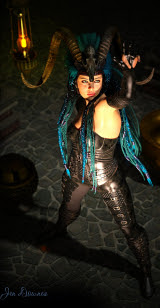
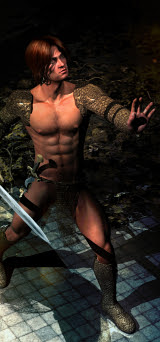
These are off the peg characters -- Dae and Rex, by a designer called Gypsy Angel. Before I can start to design my own characters, I need the G8 head morphs, and a lot more hairstyles. Getting there -- one thing at a time, right?! Am juuuust starting to give up on DAZ tech support: I don't believe they know what the file-save problem is, much less how to fix it. (It might not be fixable, so it's up to me to find a work-around and just get past this. I think I'm about halfway there.)

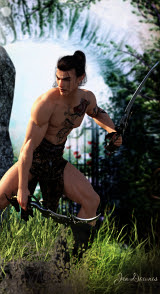
I call this picture "Hunters" ... these guys are a team, and they're out there in the wilderness, among the remnants of a ruined civilization, tracking ... something or someone. This was a four-hour render in Iray, at which point I called it "good enough" because the last hour made no visible difference to the quality. That's as good as I'll get with my computer, and in fact, it's pretty good. I can live and work with this, so now we start to get some traction and go forward. (IBL lighting here, and complex render settings. If anyone is interested to know them, drop me a line -- I'd be glad to share what I've learned, and what works.)

Haven't posted art for a few days, because I just didn't get any results worth posting: not all experiments work, and although you learn a lot from things that don't work, you wouldn't upload the results! One thing I am working on, though, is an inventory of my "assets," being all the props, materials, poses, characters, whatever, I own. Got to do this. The whacked out way in which Studio 4.11 lists assets will make it utterly impossible to keep track of them without a list, so -- start as we mean to go on, as the old saying goes. The list is huge. I mean, HUGE. Am about halfway there, once again...

This one worked out fairly well:


That's the old Garden of Galahad set, rendered in Iray, with the lighting set up to simulate sunset or dawn. It's reasonably good, though I wouldn't say Iray really likes the old materials. It would doubtlessly be far happier with shaders, shaders, shaders ... but there aren't any for this, and even if there were, it would take all day, or days, plural, to replace all the old mats with shaders; and what would you spend the time for??? (I think I actually prefer the old raytrace, which isn't trying to be a photo, and does look rich and deep with texture and rugosity. There's a new word for you: the quality of being rugose. Look it up.)

Anyway -- more art soon. Lots and lots of things to play with! I just got some shaders from DeviantArt, and some poses from Renderosity. Must get some more hairstyles for G8, and I've been looking at these:

Ajax hair

Landis hair

Orson hair

Blair hair

Heath hair

Varun hair
Royce hair
...why don't I just go out and get that lot? Because that shopping list is worth over A$200! And also, most of these hairstyles are actually Genesis 3 styles which sorta-kinda fit G8. They can be a bear to work with, so I'm a little hesitant to lay down so much cash. There's no much available, yet, specifically for G8. Hopefully, designers are busy behind the scenes, but at Renderosity 99% of all G8 assets are (you guessed) for the female. There's only a couple of hairstyles for G8 Male, and they don't look very good at all. Ack.

As I said, one thing at a time. I like the look of Varun and Landis. Have put them on the wishlist, and ... the fact is, the rolling discounts are going on all the time. Everything, bar none, is on sale, every few weeks or so. I'll just keep an eye on them and be patient!

More soon. For now ... that's it for me, for today. Yawn. Heading for bed in a few minutes -- it's almost midnight, no wonder I'm yawning!

Tuesday, July 9, 2019

Warrior of the Wasteland, anyone --?? Plus his horse, and more...


This one is pretty good ... am getting enough costumes, wigs and textures (shaders?) to mix and match, and start coming up with something that's part-way original ... and getting enough experience to know that the automatic "wardrobe wizard" that's supposed to make Genesis anything fit Genesis 8 is not 100% reliable. Sometimes it works, sometimes it doesn't. You pretty much take it as you find it, and go on to something else if it fails --

I'd say, "Hey ho," if 3D "assets" (costumes, hair, whatever) weren't so expensive. Stand by for a teeny little rant. Sorry, guys, but I gotta say this stuff. Having to buy everything afresh for each new base figure gets rough for someone whose pockets aren't so deep -- and in fact, I've heard this on several forums. Am not the only one saying it! Also, have been going through the DAZ Marketplace and looking for stuff designed specifically for G8 Male, which would take the ag out of the work; and the fact is, in terms of costumes and hair, there isn't so much, yet, for this guy. As usual, 95% of everything is done for the babe, G8 Female, and the male base figure is still severely neglected. So there just isn't -- yet -- the depth of costuming for him, though there are some lovely skinmaps (you're looking at one here: Rex). I'm almost tempted to go back and take a look at the Genesis 3 figure ... but that means I'll have to chuck another hundred bucks at skinmaps for G3, in order to tap into the larger wardrobe and hair. [Rolls eyes]

Anyway -- that's enough ranting. Let's look at what we can do rather than growling about what we can't, right?

One thing that didn't work out so well is the Shavonne Hair, which is a Genesis 3 hair prop which should fit G8 like a charm. Hmm. Not so good, actually, especially when you try to get it to get it to sit well over a costume. So this wild mane is about half Shavonne Hair, and half hand-painted. Not that you can't paint the hair; but you shouldn't actually have to. Still --


It's actually a hell of a nice result, so I'm not going to complain too much! The brushes to paint this hair, incidentally, are freebies, from All Free Download (dot com). Just go there and search for "photoshop brushes" and be astonished at what comes up. I'd love to give individual credits to the designers of these brushes, but the fact it, I used five different brush packs to get this effect and I have no idea who should be credited for what. It gets very muddled, very quickly, when you're trying to create something like this. Or this:


Best I can do with the old Millennium Horse from about 2010. There are better horse base figures now, I know! One day soon I'll have the cash to invest. For this one, above, I used CWRW's textures on the model, and also her Manes and Tails pack to achieve the luxurious mane in about a third the time it would have taken to paint it. (It's a 2D texture pack for Photoshop, available from Renderosity, if memory serves me; I know you can still get it). Two hours cooking in Iray, another hour to set it up before rendering last night, and another hour to paint it, this morning.  It's fairly decent, but I know -- fact -- the results you can achieve with the Hivewire Horse will blow this away.

Check this out, for a start:

Catalog image: Hivewire Horse base figure
I'll need about a hundred bucks for the base figure, textures and poses. One day! It's out there. If nothing else, I have a birthday coming, LOL. Everybody needs a hobby...

So the next thing I'm going to do is put this post-apocalypse barbarian warrior together with the black horse, which for some reason just renders better than this Hancock Bay. Or I'll try a new color/texture for the horse. Perhaps because I rendered them on the same day, I'm "seeing" them in the same story. I'd say he was a "warrior of the wasteland," due to the Badlands Gladiator costume (which reminds me somewhat of Mad Max, if you load the whole thing ... here, I turned off most of it, kept only the odds and ends I wanted, added a pair of jeans, then switched out the texture for a leather shader on the pants), but the horse is obviously in a green place. There's a story here, and it's tickling the edges of my imagination --

Stay tuned! Am also about to load up the Garden of Galahad set, see if I can render it in Iray. I might not be able to ... its a lot of polygons, and Iray is extremely demanding in terms of RAM. You can easily "choke" the CPU or GPU, which needs to hold every last polygon in memory. Ack. It's this set, a big one (I just rebalanced this piece and re-uploaded it here -- worth a look):


I also have no idea how good the Garden of Galahad set is going to look in Iray. First, all its textures and maps are designed for 3Delight. Second, I overdrove all the bump and displacement maps to get this effect:


...and I know ahead of time that overdriving bump and displacement maps doesn't work in Iray. So the Garden of Galahad could look very, very flat and disappointing in Iray. Won't know till I try, and this is today's first experiment! (Ooooh, how I wish Reality had worked out... fiddlesticks. 😶

Stay tuned...

Monday, July 8, 2019

First look: new character and hair. Hello, beautiful!


Just one image today ... but it is a humdinger. A new character and hair -- and I'm running tests to see how it renders. A treat, is how it renders! This is Rex, and if I tell you the truth, this was the character that made me bite the bullet and get involved with Studio 4-point-whatever and Iray, because this is a Genesis 8 character and it can only be done in Iray, which demands Studio 4.9+ ... so!

In fact, DAZ has been having a 50% off sale, so I got this  character and another, plus this hair, and a set of the best eyes for Genesis, and (ouch!) the G8 Male Body Morphs, at full price. Yes, I know, I just dropped over a hundred bucks, but at least you came home with a swag of goodies!

There are so many permutations of these characters and hair props, it'll take eons to work through them. You could actually use any one of five different permutations and call it a new character. And, I wonder ... could you take the skinmap from one character, the face morph from another, and the body morph from a third?? The possibilities are endless, even before I start designing my own G8 characters -- which I will be doing as soon as I get the head morphs, to accompany the body morphs. (Alas, they're sold separately and cost A$30 each, so it'll take a wee while.)

Also -- I think I might have Iray performing properly, to wit, this render, above. The thing is, I think I'm cheating. This is, I think, the best render I've had so far ... and I didn't create a camera. I did IBL lighting and rendered the perspective view, and -- 1) the eyes are good; 2) the shadows are good; 3) the shot is beautifully balanced. The missing element is the camera. And yes, I know you can't get DOF working without a camera, but I have to admit, it's a relief to just get a really good render, DOF or not, camera or not!

Speaking of depth of field ... it does work differently in Iray than in 3Delight, and I'm planning to spend a whole afternoon getting it figured out, as soon as this splitting headache stops ... yes, this is Day 5 of the skull-splitter. I live for the day when it ends. Then, I found a really great tutorial on YouTube, and I'll just have that running on the laptop and Studio running on the desktop right beside it ... skip over all the preliminary stuff, because 85% of it theoretical and pertains to 3Delight, which I can drive in my sleep. But close to the end it gets to the Iray DOF stuff, and that's where it gets interesting.

So there you have him: Rex in one of his permutations! The catalog images look like this:


...that hair is listed as being the Elan wig, but I do have that one, and it doesn't look like this -- or, I haven't found the way to make the prop look like this yet! There's also some displacement mapping on the character in these renders, that isn't in the default load -- need to find that too. But as a first look, first test of the character, I'm very happy indeed.

Incidentally, the hair he's wearing in my render is Shavonne Hair, which was actually designed for Genesis 3, but it turns out that almost anything for any of the Genesis figures does work with G8, so that's a mercy. Means I can buy just about anything, and it'll work. Big grin.

Stay tuned. Soon as I get this headache stopped, I have tonnes of stuff to do. If it doesn't stop soon ... well, the words 'doctor' and 'MRI' have been spoken, so ... ask. Bear with me.

Thursday, July 4, 2019

Step into my parlor ... and the best images from our Cape Jervis 'getaway'


Hmm. Not bad ... I left this rendering for a couple of hours after I went to bed last night, and it's fairly creditable. That's most of the Dae character face (you can dial it up and down), and the Dae skinmap with one of the warpaint options; a different hair prop ... a shader on the pants, a pose. Add a couple of low-poly props, IBL lighting and a single spotlight to give it at least some shadow ... chuck in a backdrop. Render for two hours, then ship it into Photoshop and overpaint it to make it more interesting, because it's a very simple render which was basically designed to run a bunch of tests...

First, I wanted to figure out how to stop the G8 eyes shining like a pair of flashlights! The sclera -- that is, the white of the eye -- is inclined to be incredibly white and bright. Now, the tip is always, "go into the surfaces pane and add a little color, like a chromatic gray, to the base, or diffuse color." Uh huh. Well, that didn't work. I wound up setting the diffuse color to black ... and every other color associated with the eyes; and setting gloss and reflection to zero ... and still the sclera looked like it was illuminated from within. Goa'uld. I wondered if it was something to do with the specific eye maps on this model, so I bought a set of Genesis 8 eyes and tried those, to see if any difference would appear in the renders when a new range of settings was applied along with the new maps. Nope. I tried everything under the sun, and still ended up putting this into Photoshop and blatting some color onto the eyeballs:


That's just Genesis 8 Male, just it comes, with one light plus IBL lighting, and the sclera is shocking. It's a bit better for being painted, but it's still not right. So I set this aside and went back to playing with every element in the scene. And from what I've seen so far, it comes down to this: do not point a light directly at his face. If you do, the sclera glares, no matter how dim you make that light. This can't be right, but this is the result I'm getting to date, even with eye shaders purchased separately. Hmm. Well, not pointing a light right at him did get us natural-looking eyes in the top shot, which I call "Step into my Parlor." The experiment continues!

I also re-rendered an older image, to see how Iray would handle it:


That was something like a 100 minute render ... very nice indeed. This was also the first image I've tried rendering at 1200x1800 size in Iray. Have been working at 600x900 for the sake of speed ... I don't have a crash-hot video card, remember. This, however, is terrific. I'll see how the other one renders ... The Horse and his Boy, where the hunky hero is standing with the black horse. With any luck, it also will be very lovely, but rendering Michael 4 in IRay can be something of a crap shoot. Cross fingers.

Last art for today: a wallpaper at 1980 x 1020, which should suit a lot of monitors, and is easy to convert:


This looks good, with all the system icons stacked on the left to leave the eye candy free. You're welcome! More wallpapers to come.

Lastly, a half a dozen of the most astonishing shots from the short 'getaway' Dave and I took at Cape Jervis and Deep Creek, last Monday-Tuesday. I took about a thousand shots, but these are just perfect! Back in a day or two with more art ... as soon as this splitting headache goes away...