Friday, July 26, 2019
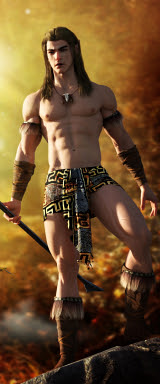
Pinup boy ... and Morning in Gadomar ... whooo!
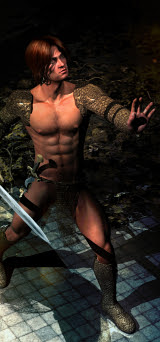
Now we're cooking. Playing mix and match again. That's the Dae face, boy tweaked by me, he's wearing Michael 8's skinmap, Michael 4's hair, a fabulous rose silk shader on the shirt, big blue GP Character Eyes, Bryce 7 Pro sky behind DM's Gadomar set, from years and years ago ... and a four hour render in Iray, after I went to bed. Take a closer look --
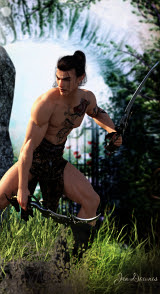
Now, those are the skintones we've been wanting to achieve. Four hours, is it? O...kay. I can live with that. The second picture --
That's a two-hour render -- Dae face, body and skinmap, wearing the Elan hair for G8. It actually needed to cook about another hour, but I just didn't have the time to let it go and go. That's the downside to Iray: it takes over the whole system, and while it's rendering, you just walk away and let it do its thing.
Anyway, we're just starting to get into the rarefied atmosphere where exceptional renders happen ... and I shopped another sale at DAZ, for two colossal packs of shaders. They'd have been A$105 for the pair of them, and in the sale, I got them both for $35, which I can just about afford. I now have something like 700 new shaders to play with, LOL: and there is so much to learn!
Having some serious fun with this, even though the file-save problems continue: I can't save anything. You just have to put the scene together, render it and dump it, because when you try to save something, when you reopen it, there's a pile of boxes where your 3D assets should be! DAZ tech support is still trying to figure this out, but -- no joy so far, and it's been on an open ticket with the help desk for two months now. Ack.
Anyway, back soon with more. But I'm grinning somewhat ... I have Iray halfway tamed. Wahoo.
Labels:
characters,
IRay,
rendering,
sets,
shaders
Thursday, July 25, 2019
Iray lights, glass shaders -- and 'his evil twin' ... he he he!
O...kay. DAZ was having a sale, and I was able to get the Genesis 8 Head Morphs for half price, plus a pack of glass shaders, and so forth. All of which inspired me to play. Two versions of the same character -- also two versions of the same hair. The character is about fifty percent my own, face and body; the hair is an adapted version of the Morley hair prop (which is "sticky uppy," lopsided and rather punk ... not to my taste at all). Anyway, here you have twins, a hero and a villain ...
-- this one being the villain! This is cool. It took a bit of painting in Photoshop after the fact, because after two hours each, these renders still have a bunch of "unresolved pixels," and I just don't have any more time to spend on them -- if, indeed, my computer will render at any higher resolution. I think I'm already maxed out as per the resolution I can get. More experiments are in order!
I know, I know, I said I was going to see if I could get the Yannis Rasta Dreadlocks to load and fit Genesis today (since I discovered that the M4 Mon Chevalier hair fits G8 so well), but it's going to be a looong job, and the way things worked out this afternoon, I didn't have time. However, it's high on my list of priorities.
It was fun playing with shaders on the set, too: I changed out the materials to glass and marble, which makes them much more visually exciting. This is where the fun begins, I think! Iray is all about shaders and ... lights. And I decided to save time, since my life is getting busy. Yep, I bought a pack of Iray "plug and play" lights. Probably saves you upwards of half an hour per project, and I imagine the end result will be better. (Blast. I'd intended to learn this, do it myself. And I probably could, given about six more months of pure frustration; but life is getting busy again ... the truth? I don't gotz the time to reinvent a wheel other people perfected yonks ago. So -- long story short: do like almost everyone else does, pay $11, buy a pack of lights, save time, and enjoy, LOL.)
Anyway -- tomorrow looks good for art, and I'll get to those dreadlocks! I hope. Stay tuned!
What you have here:
Genesis 8
Michael 8 skinmap
Face and Head Morphs
Morley Hair (adapted)
Dark Prince costume
All Action Poses for G8 Male
The Fountain set
Clear and Frosted Glass Shaders
Rock and Stone shaders
ElianeCK Lights
Photoshop post work
...everything except the Rock and Stone shaders came from the DAZ marketplace, and that final item was from Renderosity.
Oh -- one last thing I can add here. I've noticed that a lot of people are on the forums, very confused about how to install third party shaders (from CG Share, DeviantArt, Renderosity or wherever) so that DAZ Studio can find them. It took me a while to figure it out, but here's the directory structure for them:
C:\ Users > Public > Public Documents > My DAZ 3D Library > Shader Presets
...and to find them within Studio, go to:
Content Library pane, open Daz Studio Formats > My DAZ 3D Library > Shader Presets
... awhatever you copied into this folder will be there.
Note: you'll almost certainly have to install the shader pack with Studio closed, then reopen it. "Refresh" ought to work to, uh, refresh the listed content, but it certainly doesn't on my system. You can run around in circles, trying to find something you just installed, and it doesn't show up till you close and reopen the program. Hope this helps!
Wednesday, July 24, 2019
Mix and match ... M4 hair fits Genesis 8?!
![]() |
| Dae skinmap and face morph, customized body morph, GP Character Eyes, and (get this!) Michael 4 hair, the Mon Chevalier hair by Neftis. Yep, it fits the Genesis 8 figure. So surprised! |
I honestly never expected it to work, but it just dropped into place. This opens up vistas of possibility -- for instance, will the Yannis M4 dreadlocks fit Genesis 8? Remember this hair, on the barbarian guardian --
That's the Rasta dreadlocks, which always looks fantastic on the M4 figures. There's no guarantee that it'll render in Iray, but -- what the heck, the Mon Chevalier hair renders well in Iray, so this has to be worth the experiment! Tells you what I'll be doing tomorrow.
Meanwhile, the file-save problems continue to bug me, making DAZ Studio 4.11 a right royal pain to use. I can load, render, save and reopen the Genesis smart content, but everything else is lost in the save routine. Studio 4.11 is corrupting the files during the save process? I dunno, but it's making it very difficult for me to do complex work. Also, I'm still far from happy with the lighting I'm getting with Iray. It's enough to make you tear out your hair. *Sigh* I might (gasp; groan) just do as everyone else does, admit defeat, give up and buy lighting sets. Uh huh. I even went to DAZ and scouted up the very lighting sets I'd buy, if I was going to surrender... I just haven't quite surrendered yet, LOL.
More experiments to run, now that the domestic issues are sorted. Let's give this another shot tomorrow.
Friday, July 19, 2019
Lace, leather and glass ... anyone for fantasy?
Lots of experiments going on in this one. The lace shader looks very good on the whole shirt rather than just the collar and cuffs ... the Elan hair has alternative transparency maps to make it thicker and shinier (nice!) ... the soft black leather looks great on the pants ... the simplest glass shader in the world turned an ancient prop into something quite interesting ... but try as I might, I couldn't get Iray to give me what looks like an "Iray render" of the skintones:
This has been into Photoshop for digital grading, and it's still far more like a raytrace than an Iray render. My challenge now is to figure out what happened to the fantastic skin tones I've come to expect from Iray. This is the Rex skinmap; you know for a fact the tones are in there. Why did they render blurry or muddy?? Good one. I'll look into it!
One of the give-aways with the basic DAZ Studio is a set of very basic shaders, just enough to get you started and whet your appetite for more. When I set up this scene, the only prop Studio 4.11 could find that would be interesting in context was this one, from Anton's Treasures of Egypt ... released circa 2010, maybe 2008! The surface textures on it render well in 3Delight, the raytrace engine, but Iray makes a mess of them. Now, the original texture was gold, but I haven't yet shelled out the bucks for a metals shader pack. So I had a rummage around through the shaders packed with Studio 4.11, and --
This would have to be the simplest glass shader imaginable, but it saved the prop. I wouldn't call this picture anything remotely like a high-rez render -- then again, nothing about the whole picture looks high-rez to me, even though it rendered for about two hours. I could have let it cook longer, but the fact is, I went over it closely, looking for unresolved pixels (ie, grain in the image). There aren't any. It just looks ... like a raytrace. So --
One of the things on my shopping list ... glass shaders. Like this:
![]() |
| Catalog image. See this... |
![]() |
| Catalog image: see this... |
Subscribe to:
Posts (Atom)