Friday, June 18, 2010

Textures for fabric, rock -- and human skin, in DAZ


Deep Shadow Map ...
wish these could've been raytraced!


The Arabian Nights in 3D ... think about it. Well, there's something halfway similar coming up on the big screen soon: Prince of Persia -- in 3D! Jake Gyllenhall has been a favorite of mine since waaaay before Brokeback Mountain. I saw October Sky years before Brokeback ... actually, it was the in-flight movie on a long, long flight. Image this: I actually enjoyed an in-flight movie and chased down the dvd years later! Makes a change, doesn't it? So -- Jake Gyllenhall in an Arabian Nights spfx/punch-up movie ... in 3D. I'll be off to see that one!

Movies aside, today's renders are all about playing with textures and colors and light. I love the juxtaposition of orange and either deep blue or purple. So I loaded up the columns from DM's Lair, and changed the textures for something like a deep orange sandstone. Changed the banners to something just as color-soaked. Pose my Sinbad character in the middle of all this, and change the testures on the clothes he was wearing the last time you saw him.

It's still the Lockwood for M4 shirt -- which the Indian boy was also wearing in one of yesterday's renders too -- new texture on this. I can really recommend this model ... marvellous quality throughout, and it loads fast in DAZ, without any nonsense). The sky was done in Bryce, and this provided the deep blue that gave me the inspiration for the rest.

The top shot in today's post is the only one that was raytraced ... if you're going to spend ten minutes on one render, make it a good one, right?

The interesting experiment today was with the displacement maps. The closer you get to an object (the trousers, for instance), the more likely it is to come up looking like a piece of plastic. Solution: slap a nice displacement map on it and crank it way up on the intensity. I've blogged at length about displacement maps -- there's a whole series of posts that make a great, loooong, tutorial, on this subject. Two posts in particular you need to see, if you're wondering how to make all this work:


http://3d-adventures.blogspot.com/2010/04/working-with-textures-in-3d-art.html
and
http://3d-adventures.blogspot.com/2010/04/working-with-textures-in-3d-art-part-3.html
...there's others, but those are the main ones. Enjoy!

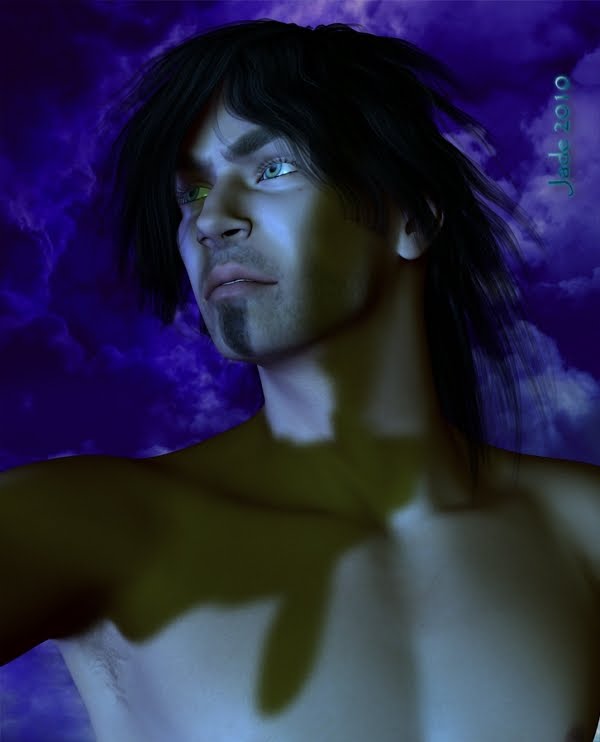
Usually, when you think of displacement mapping you think of fabrics and stone and wood. But the closer you get to a FACE in 3D art, the more likely it -- also! -- is to start looking plastic. So try putting a displacement map on the character's face, too.

What you want to do it open your Surfaces tab and select Michael 4 - SkinFace. With this selected, you can then look under your Basic tab, and there's a dialog there that'll tell you instantly what texture is being used for the face. Notice what it's called. Then go back into the Advanced tab ... scroll down to "Displacement," and it's almost certainly going to say "none." Click in this field, and when the long, long list of textures used in the scene comes up, look for the same texture that's used for the facial skin. Select this, and then just drag the slider to get the intensity of "rough surface" you need to make the character's skin look real.

Have a look at the closeup portrait from this post. I did reduce the size of it a bit, but even at 600 pixels wide (which is 25% smaller than it was rendered) you can see great skin texture on it. This works!

Jade, 18 June

Thursday, June 17, 2010

To raytrace or not to raytrace ... it's a question of time


Raytracing experiments, and testing a new costume in action, and returning to a character who fascinated me and was left behind too fast -- all at the same time. Actually, it's "just" a grab-bag of renders done on the fly to test things out! These are the leather pants that are part of the Lockwood costume for M4. Yesterday you saw the shirt with one of the five great textures that are supplied along with it. To test drive the pants, I thought, why not go back to the Indian model? And while we're there, why not play a little bit more with raytracing. What's the difference between raytraced shadows and the deep shadow map? Well, first there's the visual difference...


All except this one, above, are raytraced. In the medium-tone areas of the shot (skintones) you can really see the difference in image integrity. Raytracing gives a much clearer image ... if you have the time! The second big difference is that it takes a looong time to get a raytraced render. Each of the raytraced images in this post took about ten minutes, whereas the deep shadow mapped render took about twenty seconds!


But if you do have the time, it's more than well worth the wait. These images are very basic: Michael 4 is wearing the Falcon skinmap and the Spartacos hair, and the Lockwood pants, and he's standing in a tiny part of the DM Instances set ... and I rigged one light. Just one. Then, to finish off the "shoot," I added the Lockwood shirt with the brightest and most exotic of the textures:


That's quite the fabric pattern ... and the integrity of the image is terrific. Gotta admit: I love this new videocard, and the extra couple of gigs of RAM make a world of difference!

Jade, 17 June

***Posted by MK: my connection is intermittent, too slow for this. Seriously, guys, I've got dialup speeds. How are you expected to do anything these days, at 1990 dialup speeds?!!!

Wednesday, June 16, 2010

3D costumes -- and dawn rising in a Bryce sky


DAZ's Michael 4 gets a new shirt -- and it's a beautiful prop. You're looking at Lockwood for M4 here -- complete with one of the textures supplied with the model (and there are four more, before I start playing around with my own textures). Verdict: fantastic.

Look at this for fit and style, even before you get to the textures, which are fantastic. I'll use some more of them in the next few days -- they're lush and exotic. In fact, the shirt and its textures made me think of my Sinbad character from a few weeks ago, so I reopened the old project and used that character to display the new shirt! Ooooooh, nice.

The rest of the Lockwood set includes a very good pair of leather pants, and a pair of shoes. The pants are the next thing I'll be testing out. You're not looking at them in this series of renders, but I suspect they're going to look fantastic on the ronin, whom I like so much, he's gotten a name: Subotu. You remember him from yesterday's renders --! And go back before that, here was the first time you saw him: the archetype of the fantasy hero. So you'll more than likely see Lockwood's leather pants on Subotu, while Sinbad, here, is actually wearing the Beowulf slacks, with one of my own textures slapped on them for an exotic look.

The background is DM's shrine ... last time you saw it, the moon was up and the stars were out. This time, I switched out the backdrop -- dawn is coming up. The other two characters who were in the shrine by moonlight have gone and Sinbad is watching the dawn rise. I did that sky in Bryce a while ago -- never had an excuse to use it, but it's perfect for this scene!

Jade's verdict on the Lockwood set: five stars. Fantastic quality ... also, on sale right now.

Jade, 16 June

***Posted by MK: my connection is intermittent, too slow for this. Seriously, guys, I've got dialup speeds. How are you expected to do anything these days, at 1990 dialup speeds?!!!

Monday, June 14, 2010

Fantasy swordsman ... GIMP brushes .. a touch of romance


UPDATE: these renders were done in June, 2010. See the 2015 re-render in LuxRender here.

The swordsman -- going back, today, to the ronin who rescued the princeling in this week's series of renders. I'm actually fascinated by this character ... the exotic wildness of him. These shots would be before the first renders where you saw him (in this post, entering by stealth the camp of the warlord who abducted the prince).

In these renders, he's jut discovered what he's going to have to do ... and it's going to be dangerous. Like the Samurai of old, he gets the last rites before going to battle, he's technically dead when he goes out to do the job, so what does he have to lose? And part of the preparation for doing a job this dangerous is the "moving meditation," a bit like Taoism -- a sword kata that clears the mind.

I really like these characters and this scenario. You know, I'm almost tempted to write it ... except that I'm not much of a writer. But then again, if I did it as a graphic novel... Hmmm. Let me think about this a little! In case you're wondering, the backdrop is not Bryce; it's a work done entirely in gimp brushes. There's a terrific set, from Renderosity, Mystikal's Clouds. Best set of clouds I've ever seen.

Jade, 15 June 2010

UPDATE: this is what's going on in 2015...!