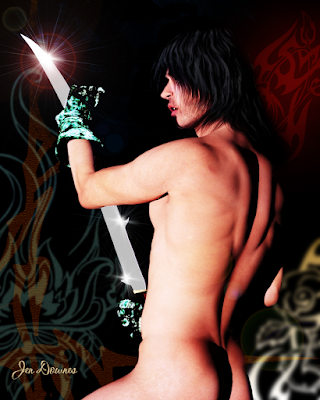
Been busy ... fiddling with IRay, trying to get it to play nice. Sorta halfway there, although we're not seeing the glorious skin tones that are definitely possible:

Right now, what I can squeeze out of IRay using Michael 4 is like ... "raytacing on steroids." These are seriously nice renders. They're not photographic by any means, but very nice renders. Have been reading on forums and tutorials, and (most old hands at this say) it comes down to needing to buy all the maps and shaders in the world to get those glorious skin tones. And here's the stumbling block: there are no shaders available for Michael 4. They only entered the repertoire with Genesis. The old figure is pretty much abandoned as per specialist shaders, which means that coaxing photographic results out of IRay with Michael 4 is probably not possible. I can maybe improve on this a bit, but to get astonishing results, we'll need to look elsewhere.
Try this for size, for a start:

I did this in 2015, in Reality/LuxRender. In Reality, it's just a few clicks to configure it, and you can re-re-readjust the lighting on the fly during the render. This was done with Reality 2.0. The current version is 4.3; and I got this result in about two hours flat, including posting the model:

To my eyes, this looks better than the IRay render of the same character (same skin map, same lights, same everything). The Lux Render is actually tickling the line of being photographic ... and the software is 100x easier to use than IRay. Soooo...
Just waiting to get the bugs ironed out. Waiting for tech support, but they only write/reply once per week, and this is taking forever. *Sigh* Anyway, at least I've learned the Studio 4 interface backwards and sideways while trying to coax a decent render into being!
And in the course of mucking about, I found some extremely rudimentary morphs that allow you to at least make Genesis look like an adult rather than Peter Pan:

It still looks like a cartoon of a human, but at least it's not an adolescent body form now. What really is creepy is, if you "hide" the costume so as to see the torso, there isn't a detail on the skinmap. No freckles or hair chest, sure, I can see the sense of that. But the Genesis doll has no nipples, which looks ... creepy. You can put body builder muscles on this guy, and he has no nipples. You don't realize how odd it looks till you see it. I guess mammals are as mammals do! 😮 Alas, to do much more with Genesis, you have to chuck a lot of money at characters, toupees and costumes. Right now, I don't have the cash, it's as simple as that! You'll have to bear with me while things chug along as fast as they can. Blame the dentist, LOL.
Also -- something very exciting is happening:

Yes!!!! There is a new Mel Keegan book on the way! This is fabulous news, and it's been a thrill designing the cover. I did most of it in Bryce 7 Pro, working with an old image from years ago, which was re-edited to take out the ocean, move the mountains and so on, so that the background started life like this, kinda like a Chris Foss book cover from the days of yore:

...before it went into Serif to have the byline added, then into DAZ Studio 3 to have the character rendered, then into Photoshop to be painted, then back into Serif to have the title overlaid. There might be some nips and tucks or tweaks to be done to it later -- I have all the files, it can be adjusted at whim -- but the author is delighted with this design. And so am I!
That's all from me for today. More soon ... still experimenting at full throttle!