Showing posts with label digital painting. Show all posts

Saturday, July 26, 2025

Art as a reward for work done


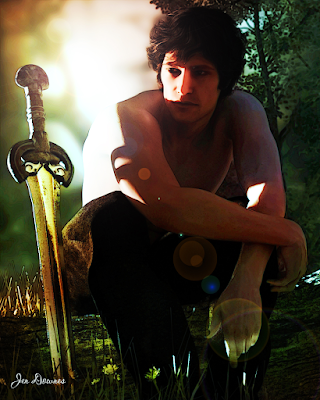
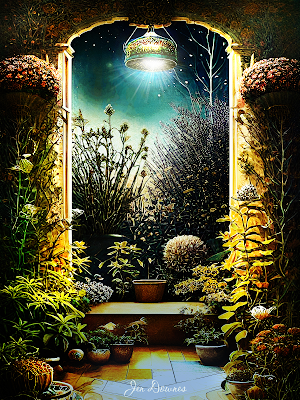
I tent to reward myself for actually finishing something, and these days, that is a huge thing. Well, I just signed off on a very major project (an editing job), so here I am -- celebrating. I call this one, above, "Little Angel." It's pure AI, though it could have been done in CG, if I had 5x more processor power ... and the bucks to buy the hardware. I haven't. So it's 100% Jen's imagination, and otherwise, free AI, because that's what I can ruddy-well afford right now.


This one mind you, is 70% AI plate and 30% Photoshop painting. The original plate was done in dream.ai (Wombo), and if you know anything about Wombo. you'll know  that it being free is the best thing about it. The images it tends to produce are very prosaic, very flat. But, being so flat, they tend to lend themselves to painting, so ...


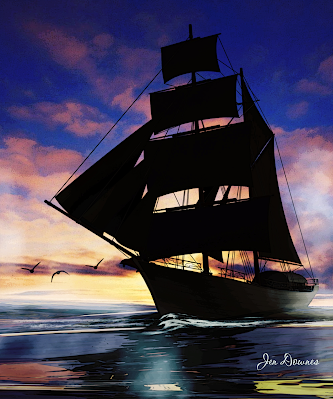
This one is about 55% AI plate and 45% Photoshop. It's a first foray into colorization, where you can take a b/w sketch and turn it into colour art, the kind of thing you may see in graphic novels. I have a few ideas that might bear fruit in the future when then the merciless domestic situation (Dave and The Diagnosis from Hades ... argh) has resolved itself somehow. Till then, everything is just an idea, but if I didn't run with my ideas, I really would go bananas. Hunh.


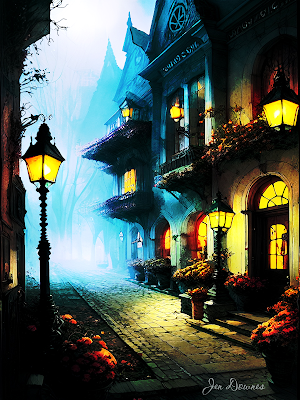
Pure AI. Note the change in the signature line. No, I never claim to have painted something that I didn't paint. On the other hand, when I've painted ... you'll know about it. So I'll just paste in the rest of this batch, and let the adjusted signature line tell all:


...and I shall return with more, when I have something to celebrate, and award myself the treat of art as a celebration.  Thanks for looking! 
 

Wednesday, June 19, 2024

Merrie Yuletide!


A Yuletide Blessing

Long is the night and the stars are bright;
Cold is the wind, and sighing.
Bare are the trees -- there's snow in the breeze;
Silent, the land... but not dying:
Sleep is the cure when one must endure --
Lord, knight, lady and fool:
Here is the night when back comes the light:
Blessed be all, upon Yule.


ooOOooOOooOOooOOooOOoo


Merrie Yuletide to all!


This is such a bittersweet festival to me, because the Winter Solstice also marks the anniversary of Mom's passing. And this year, it's more significant than ever. I can't believe that it's been seven years since she passed over. Seven years. She was born just short of the Winter Solstice in the northern hemisphere, and she passed on the very eve of Yule, in the south. I told her story here, so in this post I'll just say that I miss her, and always will. Wherever you are, Mom, I hope you're happy.


This year, we decided to celebrate the festival properly, with a small tree and some little gifts, and a midwinter feast. Nothing vastly elaborate, but something to break up the winter, which is turning out to be very cold indeed. Most of the continent is in the grip of an acutely chilly snap -- temperatures well below zero in the early morning, as far north as Queensland --


Not my photo!!! Borrowed from ABC News, to make my point, because (duh) I don't live in Qld. 


 --a nd there's really no answer to that, is there? Well, actually, there are several answers, but most of them involve jokes and the practise of banana bending, and there's not especially appropriate. So.


It's been a very long time indeed since I posted regularly to any blog. Life has been a bit rough, but I'll set down enough here to at least patch the gap a little. March and April saw me insanely busy. I did a stupendous amount of work on a new website, and as a consequence neglected others. It still isn't 100% complete, so I'm not (yet) going to link to it. Then in May, Dave and I got Covid a second time ... and everything sort of...ran off the rails. Long Covid is no joke, and there is no other explanation for what's going on with my health. I'm just exhausted, achy and confoozelated, a lot of the time. What can you say? I have eight tonnes of projects waiting to be tackled, and I don't have the energy, inspiration or creative zeal to sink my teeth into anything. No gumption. I hope this will change soon, but right now I'd have to say that the last four months or so have zipped past in a blur. It's not just this blog I've neglected ... I haven't posted a line to Facebook in almost as long!


In fact, Facebook is rather a sore spot for me at the moment. The AI driving it rubbed me the wrong way just once too often. I was getting time bans (which I believe they call Facebook Jail) for NOTHING I had done, including a lifetime ban from something they call the "FB Marketplace," for "contravening their community standards" -- which was a bloody good trick, because I have never in my life even seen this FB Marketplace thing, much less clicked a mouse on/in it. Huh. The last time, FB banned me for a day for something I did "yesterday," when I hadn't even looked at a ruddy computer for a week!!! I saw that cheerful little message when I turned on my phone to get the time at 7:05am, one morning in March ... and I walked away from Facebook. Should I go back? Maybe. Will I? Possibly. If I have a good enough reason.


Actually, the good enough reason is probably sitting under the Yuletree right now, in wrapping paper. A new camera. Canon. Mirrorless, pro-level, with two lenses -- a digital revamp of the old SLR tech of yesteryear. This time, as a new chapter in my patchwork career as a photographer opens up, I intend to go out there as a landscape photographer, because I'll be able to capture wide shots in the equivalent of 4K resolution. The Lumix superzoom bridge cameras I've been using for the last five or six years are dandy for what they are -- I wanted to go birding at the time, and did -- but they have their limitations. I actually quit photographing landscapes, because the 1200mm zoom generally yields wide shots of such low resolution, in poor-light conditions, the work looks more like finger-painting than photography!


So ... if this pans out (and I'll soon know), I shall be able to go back to signing off and watermarking as "Jen Downes Photography," which is a luxury/arrogance I haven't permitted myself in years now. We'll see. But one thing is for sure: this is going to be fun.


So ... Merrie Yuletide to all!


And for myself, I should be making resolutions for the new year that begins as we pass the midwinter solstice. Get past the Covid blues ... be more creative ... write my own stories, as well as "just" editing for Mike (which is also tremendously gratifying, and a lot of fun) ... try and find some genuine optimism for the future ... get out there with the new Canon mirrorless camera, and capture this state in Ultra HD. 


There. Goals to strive for as we go forward.  

Friday, April 26, 2024

Okay -- I'll weigh in on this discssion with my ten cents' worth!

It rages on and on and on: AI, and what to do about it? Can it be stopped? Can artists even survive, in the teeth of AI? And it's not just art: Neil DeGrasse Tyson spoke somewhere, recently, with his opinion that AI is going to kill the whole Internet because fake content (news, celebrity videos, politics, obituaries, whatever) are flooding the whole webosphere to the point where, even now, no one knows what to believe. Fast forward a few years, and nobody will believe anything at all ... and that's kaput to the www. So ... what about AI as it appertains to ART, which is where I live and breathe? Here goes. This is my position, for what it's worth.

A LOOK AT PURE AI PICTURES
uploaded at A4/Letter size: please see

Have I used it? Yes. Why? To find out what it was about -- if it had any merit, and if I hated AI, at least I know what I hate, and why I hate it, right? Right. So, what did I learn?

The argument is that AI steals images and just collages them together ... to a large extent, rather true. Or at least, absolutely true of many (most?) of the current engines. So, AI "stealing" images off the internet is real, and rife ... and I hate this, but I also believe it's way too late to stop it now: I'm pretty sure the damage is done, no matter how angry professional artists get --

I read a looooong analysis article about this, late in 2023 (don't have a link, sorry -- just my memory), and there was this one artist going utterly ape about how the work of artists like Boris, Frazetta, Foss and so forth is being (their word) bastardized ... and they showed examples, AND you could see exactly how works from 1950 or 1980 had been subsumed and adapted. No, this shouldn't be allowed to happen, and I'm sure that -- eventually -- some government body somewhere is going to issue a law that stops it, within their sphere of influence. But remember, a US law ain't worth the proverbial hill o' beans in Russia, Thailand, Philippians, Malaysia, Pakistan, whatever. AI engines only have to move offshore, and the only thing the lawmakers could do would be to block US users from getting onto those servers. That legislation would take another five years, by which time, there'll be a workaround to fool the system. In the end ... no, I don't see legislation based on or around copyright having much effect. So, what's next?
 
Well, how about we try getting real about this. People have been using tracing paper and cameras to copy and manipulate photos and other paintings since it first dawned on someone to do this. AI collage work is not very much different from what we've all done for more years than one cares to remember. So,  for myself ... I don't see much real harm in AI art, so long as it's used as a hobby. But I have to believe it's only a matter of time before legions of artists who wouldn't know one end of a paintbrush from the other start to sell their pictures to unscrupulous (or simply ignorant!) publishers. In fact, what's already happening is that indie publishers are no longer commissioning cover art: they're going DIY, doing it themselves, with the result that people like self  -- who used to earn a few bucks at the boot end of the industry -- don't earn the proverbial brass farthing anymore.

(Yes, I used to be a cover artist, circa 2012 -- paid US$80 per cover, ooooh, aaaah, LOL. The indie publisher I worked for is closed now ... she died. There's no answer to that.)

So, in fact I have two "beefs" with AI art:

1) small-time artists like self are losing the tiny bit of cash flow we used to have -- which means a lot when you're disabled, and the creation of intellectual property if pretty much all you have to work with. And --

2) ...I'm a wee bit miffed, because I worked hundreds of hours to learn digital painting. Each "doodle" in the learning process took ten or twelve hours of work, and left me with pain in the hand, neck and spine ... the learning process was months long, also tortuously slow. Along comes AI, and blows away anything I could hope to do even after 500 hours of learning and practise. So, yeah, I could be pretty miffed if I took myself too seriously. Since it's so damned hard to learn digital painting, and the results tend to be so iffy for so long ... why would anybody ever bother to learn? Why wouldn't they just say, "Stuff it, I'm using AI." So, AI is just becoming another way via which creativity, and raw talent, are being buried. 


Now, having said all that ... I looked at numerous engines just for curiosity. Lexica, Night Cafe, Playground, Wombo, Dreamlike, Leonardo, a whole bunch more. By and large, the results I got on the FREE versions were far too poor to lure me in, and to get anything better -- they want big bucks in subscription fees. Noooo can do. You know what this means: small time artists are screwed on one side, and on the other, the owners of the AI engines are making megabucks. It could be said that they're getting rich off the backs of artists who're out of work now.

Bottom line: AI art is a great hobby, but it has a whole bunch of downsides. And that's my take on all this. If you have a different opinion -- that's fine and dandy. But I know how AI has already affected me, and my artistic future looks a little bit iffy, unless I turn this whole thing into a hobby. Which, I'll be totally honest, is all it is, anyway. Wasn't intended to be, just turned out that way, nudge, wink. So, what's all this digital painting about? Well, this:


...that's all me and my trusty Huion pen tablet. It's fun ... it's original,  creative ... and I'll be damned if I can figure out how to earn a buck with art, LOL. 


Tuesday, March 26, 2024

By request -- Tutorial: the easiest possible Photoshop landscape painting


All illustrations are uploaded
at full size -- you'll
need to view them at 1:1
to see them properly!

If you have a pen tablet and the skill to draw from scratch, any picture will start with a sketch. It’s the “proper” way to create a picture … but not too many people can actually draw! Even artists who can draw invariably start with photo references. The finished picture will, in almost every instance, be an amalgam of two or several photographs, where you have traced and combined desired elements from each and discarded the unwanted features.

Now, if you can draw, Step One is to start the project with at least a sharp idea in mind of what you’re trying to create. Once you have the image firm in the mind’s eye, Step Two is to gather the reference photos, get into your paint program (Photoshop is great for this … so is Krita), and start tracing off the individual elements that will go together to make your unique image.

But this little tutorial is going to assume you can’t draw –- or that you don’t have a pen tablet, and no immediate plans to buy one. There’s a hundred reasons for not having one, and not planning to buy one. This doesn’t mean you can’t create lovely images, using tools that are at your disposal, if you have any paint program, or Photoshop (yes, even Elements).

So, assuming you can’t draw from scratch, any image you create is always going to start with one or more photos … but rather than tracing off elements from them and combining them into a fresh sketch, here. we’re going to start simple. In this tutorial, we’ll take the simpler (faster) route, and create a painting that takes no drawing at all. None. I promise.

It all starts with at least one photograph! In a perfect world, it would be your own snapshot, but if you live in a desert and want to paint the ocean, or on the plains, and you want to paint mountains, you’ll have to find your base photograph(s) elsewhere. Ideally, these need to be free images. You don’t want to actually steal photos from photographers ― luckily, you don’t have to.

The Internet is teeming with freebie sites. There’s everything from the free wallpaper sites, which supply high quality images, to user-driven sites like pixabay.com … millions of free images that are posted by users via another form of visual social media. They’ve been made available for visitors. There is also Wikimedia, brim-full of non-copyright images. As a last resort, consider the actual gist of copyright law: a new work (literary or artistic) must be 15% different from the original that was its source. Well, even supposing you stole a photo from a photographer, the image you’ll be creating will be about 75% different, so if push came to shove … well, I leave the ethics of the art to you! I’m not here to talk ethics, rights and royalties!

Found on Pixabay (free) ... it'll do for the base image!

So, this will be my picture. I’ve sized it to 1600 to 1067. Why? Two reasons. One: this is one of the standard aspect ratios for images. Two: it’s not very big, because it doesn’t have to be very big … because I’m not painting by hand on this one. If I were going to paint with the pen tablet, using Photoshop or Krita, I would set the size to at least 2500 pixels wide. You need the wiggle room to paint ― but there is a major downside to working with colossal images. Unless you have a supercomputer, the processor can struggle when the images get so big. Any hesitation, lag or delay between what your virtual brush is doing and what appears on-screen can be fatal when you’re painting. Rather paint on a smaller canvas and avoid strife. You’ll know the limitations or otherwise of your processor, so sizing the image at this stage is up to you.

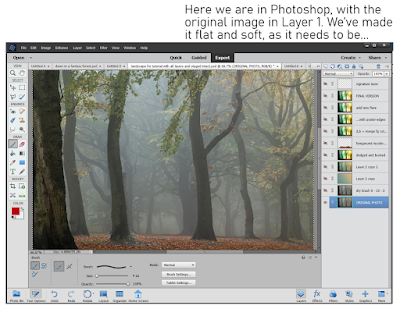
Next, you’ll notice that the picture I’ve chosen is extremely flat. This means it has low contrast, no vivid colors, no real white or black zones, and a lot of chromatic grays. This is what you want, to start with. A flat picture will accept the abuse you’re going to heap onto it, when you come to apply all the filters, all that dodging and burning, the merging of layers with blend modes, the over-burning of the lens flare you’ll be adding. If you start out with a high-contrast image, it’ll be stark before you know it, mostly black and white. So, if your image is not soft and flat to begin with ― go into Photoshop (or whatever), and deliberately make it flat and soft.

(This tutorial assumes that you know how to do this, in whatever paint or photo program you’re using. In Photoshop, for instance, you want to go Enhance > Adjust Lighting > Levels … and just play around till you see what you want. If you don’t know how to do this, just play. Make a mess, have fun … it’s the best way to learn!)

So, now we have our base picture. We’ll put it into Layer One, and rename the layer ORIGINAL PHOTO. Notice all those other layers above it, which I’ve turned off in order to show the base picture. Those layers are where the magic happens, and you’ll be in charge of every filter, blend and merge. Starting with the same image, ten artists will come up with ten different pictures, barely alike. It’s your work … you choose what’s happening on the canvas.

TIP: when you do anything in a project ― apply a filter, adjust the lighting or sharpness, always, always DUPLICATE LAYER before you move on and do one more thing. Work on the clone layer, the copy, not the original layer. If you do further work on a clone, and you make a mess (it’s inevitable; it will happen; no one is immune to this rule!), you can throw the mess in the bin and go back to the original layer. Clone it again before doing things to it. This will save your sanity, if not your life!


If you were going to actually draw now, using the base image as your source, you would start your pen tablet (Wacom or Huion, or whatever; I have used both, and currently use the Huion while the Wacom Bamboo is put away). You would create a new layer op top of the photo … you would select a brush to draw/paint with … pick a color from the photo to paint in … and, in the new layer, you’d start to trace over the shapes and forms of the trees, plants, water and ground. You’d change and adapt what you wanted to change ― say, take out a fencepost, or get rid of a parked car, or omit the trash somebody dumped!

Since you’re not drawing here, instead, we’re going to use a shortcut. Photoshop has a wide variety of filters that can sometimes give a photo some of the characteristics of art. The filters are not fool proof. They often do not work well. Even when they do work, if you just slap a filter onto a photo and call it “done,” all you have is a Photoshop filter slapped onto a photograph … it doesn’t look very good. It certainly isn’t an enchanting painting.

But the process of adding a filter to the photo is the first step in getting to the painting. This is the trick that saves you having to draw, if you can’t draw, don’t have a tablet, or don’t have the time. There are all kinds of filters, some quite good, some really bad, some utterly pointless. A handful can work well some of the time, but don’t expect them to work every time ― it can be a bit of a crapshoot!

It’s up to you to choose the filter you like the best. No one can choose this for you … you are the artist, and this is your project. The photo is going to turn into a painting in your way. No one else’s!

You’ll find the filters here: Filters > Filter Galley … and you’ll need to sort the wheat from the chaff. It’s mostly chaff. Very few of these filters will do anything at all for you. If you apply just one, the result will probably be boring, lifeless, flat ― nothing enchanting about it. This is just the first step.

So, here is Step Three: apply the first filter, whatever you choose. In my picture, I applied Dry Brush, with a brush size of 0, brush detail of 10, and texture of 3. You could use anything you like … but remember that what you choose must be matched to what the picture needs, or it won’t work out very well. This is why “Zen Photoshop” really is art, not just a mechanical process.

Experiment with all the filters. Apply them all, configure them all, delete what you don’t like till you get to something you do like. Save the file. Now that you have Step Three to your liking, immediately duplicate the layer … you’re going to be working on the clone, not the original!


Okay, now we’ve got some lines into the picture, which simulates the work we’d have done by sketching or tracing, the next thing to think about is the color scheme, or pallet. If I’d sketched the whole thing by hand, color would still have been the next thing to tackle; at this point, the process is fairly similar. Now, if I were painting by hand with the pen tablet, this is the moment where I’d take a large, soft brush and start to put in swathes of color, which set the tone, and would also decide which will be the light and dark areas in the finished piece…

Using the shortcut method, it’s not so different. To a certain extent, the colors are already in the picture, because it started as a photo ― but the colors are all wrong. I had an idea in mind when I started, and this picture is not even close. I wanted “early morning in an enchanted forest,” but the photo I started with is just a kind of misty, murky twilight. All it gives me are the shapes of the trees. That’s only the starting point. I need to get the colors I want, or it’s never going to look like an enchanted woodland.

There’s two ways to go. You might get lucky with Photoshop’s “colorize image” function ― I haven’t had much luck with it, and seldom use it, but it’s worth trying. To do this, convert your cloned layer to monochrome, and then … colorize it. See what happens. Don’t be surprised if it’s not very good; it seldom is!

So, I always go the other way, and deliberately set the specific color pallet I want. Okay, so how do you do this? It’s actually not that difficult. In your mind’s eye, see the colors you want. Now, open the color picker pallet. Choose two colors that represent the most opposite colors in your imagined painting ― it could be the sky and the ground, or the light and the shadow areas. Set those two colors as the active swatches ― ie., they will be the ones your brushes are painting with, and which are used by the bucket fill tool … and when you option the gradient tool, you’ll get both.

This is what you’ll be doing. With the colors picked according to the image in your mind’s eye, select gradient fill. Create a new layer ― and fill it with a gradient. It’s hit and miss in Photoshop, so keep stroking the input path across the screen till you see what you want. Got it?

So far so good. Now, put a blend mode onto the layer to bake those colors into the layer below, which has the photo converted to lines. Aha! The magic begins as the picture assumes the colors you want! For my picture, the blend mode I used was Overlay, at 100% opacity. You could choose from half a dozen blend modes, and adjust the opacity from 10% to 100%. Only you know what you want your picture to look like. Get in there and play with the blend modes and opacity till you see exactly what you want.

Got it? Then, merge the bucket fill layer into the layer with your chosen line filter. And duplicate the resulting single, fused/merged layer immediately, so that you can go on to the next step.


With the colors set, it’s time to breathe life into this project. The magic happens when you begin to paint with light ― literally.

Look long and hard at the picture. See, in your mind’s eye, where the light is coming from. Can you see it? If you can see it, you can paint it, even with a mouse. The tools you’ll be painting with are dodge and burn. Dodge make areas of the painting brighter. Burn crushes the shadows or mid-tones, making them darker. You’re the artist: it’s up to you to paint with light and shadow, and create the picture. You have the outlines; you have the colors. Now ― paint. You don’t need a pen tablet for this; the work is not fine or detailed. Dodge and burn are more like “area weapons” than fine-scale tools. They’re best applied over significant portions of the image ―

Tip: go carefully, applying about 10% or 20% of dodge, and maybe 5% or 10% of burn on any one click. Build up the effect, little by little, and let the image take shape slowly rather than trying to do it all in one mouse click.

You’re the artist here. You’ll need to use your artist’s eye, your judgement, and create the image you saw in your mind’s eye. Photoshop can’t do this for you … this is where the art comes into its own. Experiment; find out what works; throw the failures into the bin and re-clone the previous layer for another attempt until you see just what you want. Note that dodge and burn can both be applied to highlights, midtones and shadows, but you really can’t dodge crushed shadows, and you also can’t actually burn featureless highlight areas to any great effect. Remember, zones close to 1 and 255 have no information in them, and it’s impossible to add information that isn’t there. So be careful how far you go with dodge and burn, because when the information is gone ― when you’ve brightened or darkened too far ― you won’t be able to add it back in. Go gradually, slowly, and build up. (If you do go too far and erase too much information, there’s a trick for getting it back … you can always paste the dead areas over from a previous layer, merge them into the new dodged, burned layer, and dodge/burn them juuust enough to fill in those dead zones. It’s tricky, but it does work.)


At this point, you might decide that you’re finished. If the painting looks done to you, that’s it. If it meets your original vision, you’re done. That’s art, and the call is yours to make.

For myself … I decided I wanted more texture in it. If I were painting by hand with the pen tablet, this is the time when I would start to doodle in color(s) and put in all the fiddly bits, the detail, or pseudo-detail that seduces the eye into thinking you’re looking at foliage when, in fact, you’re not. But we’re taking shortcuts here ― allowing for the fact that you might not have a pen tablet, or else you just don’t have an hour to two to spend faffing around, doodling. For whatever reason, you can take the shortcut.

You can apply another filter, and pour on more texture, save yourself the time and work. This is nothing that you can’t do by hand ― and it’s a lot of fun killing a whole afternoon or evening with this kind of detail doodling. But if you only have ten minutes … Photoshop to the rescue again.

The filter I chose was Poster Edges, with the settings dialed way down, so the filter didn’t ruin the picture….

And last of all, I added lens flare. Go to the very brightest area of the image ― where the sun would be, striking through the morning mist. Go to Filter > Render > Lens flare, and pick one of three types of lens flare. Position the hotspot. Dial the intensity up or down till it looks right to you. This was the point where I decided the picture was just what I wanted. I did try saturating the colors, but decided this “overcooked” it, and undid the effect. I could have gone on messing about … adding birds and bokeh and dust motes with ABR brushes, but you really can overcook a picture. One of the key things about art is knowing when to stop … when to sign off on the picture, and call it good!


And the result, in closeup, so you can actually see it on the screen here? Worth a quick look before I call this post done:


...and that's the point where I signed off on it and called it done! 

Friday, March 15, 2024

As you like it...

Genesis 8, Iray

Michael 4, raytrace

Digital painting, Photoshop

One factor has characterised the last month or so here in South Australia: heat/drought. The rain stopped. The heat came. It's been ... interesting, to say the least. Not fun, but -- interesting. No, I haven't done very much art in that time. Most days, I couldn't even turn on the computer. The PC enjoys the hot weather about as much as I do. In other words, not at all.

But for what it's worth, we're close to the end of this nonsense now. It's been autumn, officially, for two weeks, and we've had some actual rain (enough to end the drought, though it didn't go on for more than a day). Temperatures will be down by ten and fifteen degrees Celsius in the days and weeks to come, and I'm looking forward very much to getting back down to some art. Also writing.


For now ... these are repaints of old renders, some of which never even saw the light of day. They were done as tests and experiments, and appear to have been shelved, several years ago. Digging back through the archives is like hunting for buried treasure -- and finding it. 


So, what's your fancy? Iray, raytrace, painting?? It's tremendously interesting to compare results across a couple of engines. For instance:

Amadeus: firelight ... raytrace; and

Amadeus, identical costume -- Lux Render

Amadeus; same costume but the textures
have been switched so shaders ... Iray is different

What makes me chuckle a little is that the textures on the costume in the raytrace and Lux renders -- well, the pants he's wearing appear to be made from the cushions on the couch we had about ten years ago, and his shirt, I kid you not, is the crochet handbag I used to carry around 2012! Ooooh, I used to enjoy making textures and the displacement maps and opacity maps and reflection maps ... why did I ever stop?! 


Must get back to this. Start up Studio, go right back to good old Michael 4, finish reinstalling all my oooold Renderosity content (I only got about a third of it reinstalled before Genesis lured me away and everything started going awry again) and just ... have fun.


Note to self: have fun this time!


Wednesday, February 28, 2024

Painting on a hot, humid afternoon

a repaint of an old raytrace... second life.

also a repaint: coming back to the original,
it looks dull and boring. Now look at it!


At the end of summer, time seems to slow down. You're hanging on, waiting for the hot weather to end, desperate for rain, and everything ... slows ... down ... as if you're in the grip of some deadly time dilation. Falling into a gravity well where something you can't even see is going to roll you flat. Wellll, that's what it feels like when it's hot and humid and you're fed up of the season! 

Not much is going on, artistically (or any other way, come to that). Most of what I'm doing at the moment is editing, though I'm about to collaborate on a story project -- a true collaboration for the first time. Can't recall ever having done this before, but my writing partner and I have developed a very easy, almost symbiotic relationship, and it should be rewarding. Even easy. We'll see.

So I spent the afternoon editing and painting to pass away the time. Only the landscapes are truly new today; the others are repaints of old projects -- the barbarian on the horse really needed it. Coming back to it in 2024, I found it pretty dull and boring, though the idea was fine. Photoshop to the rescue. In fact, I like this one enough to recut and remount it. I'll leave you with this:


It also is a raytrace ... those are not shaders, which we use in Iray. In raytracing, you're responsible for all your own textures -- and I'm just remembering how much I used to enjoy doing that. Shaders can make the work easier, but it's nowhere near as rewarding as designing a whole suite of textures yourself -- some of them, hand painted. Soon as the weather breaks, I must start up Studio (for the first time in two years!) and ... play. 


Friday, February 23, 2024

Spending a hot afternoon painting...


Spending another hot afternoon painting (also unpacking a lot of photographs from (!) November. Shows you how far behind I am!). Here's another touch-up on Chino -- a character I love, and a story I'd like to go back to eventually. It has been professionally published, incidentally, but it as a "hard sell," because it's what's termed a "frame story." In other words, a story told by a raconteur.  Every single Sherlock Holmes story barring one is told in the words of John Watson ... that's a frame story. Well, the format might have been popular in Sir Arthur's day, but -- not today. Which made The Gates of Petheris a very, very hard sell indeed. Still, it sold in the end, and I do believe there's enough meat and potatoes in it to make a short novel, which can happen in the fullness of time --

Or perhaps it would make a better graphic novel than a text-driven piece? Now, there's a thought. And it's a thought I'd been playing with more and more lately, which is why I've been running experiment after experiment, trying to find a way to produce the sheer volume of art required to publish an 80 - 100pp graphic novel. It could easily take 250 pieces of art, and since I don't expect to make much, if any, money out of it, I can't afford to spend a year working on it! 

Bottom line: I have indeed found a way to churn out a lot of art in a short enough time. It comes down to taking insanely fast renders, plus some photo montages that are largely based on my own images, shoving them through a bundle of complex Facebook processes, then painting the result by hand. The end product is pretty decent. Good enough, I think. And since Chino is already finished (and a dang good story, to boot), it would make better sense to run with this than to try to finish a looooong story like The Forgotten songs, and then illustrate it, all for no income. Ha.

So here's the fruit of a hot afternoon's messing about. The SF render is a twelve-year-old raytrace which has just had a fresh rebalance and tweak, and looks the better for it. That's Neil Travers in the cockpit of the Capricorn ... reminding me of how much I love the Hellgate novels. I could live in that universe. Must go back and read the whole thing again, total immersion, and will probably end up doing a load of new artwork for it! I was utterly immersed in this universe in 2011-2014, and a lot of the work I did back then was Neil Travers and Curtis Marin, Mark Sherrat, Mick Vidal, Richard Vaurien ... oooooh, I miss them! I feel a Hellgate binge coming on! (If you're even vaguely interested...)

Sunday, February 18, 2024

Too hot to think, so -- let's play in Photoshop

Photoshop filtering and colorization, from an Iray plate


Photoshop filtering and colorization, from an Bryce plate


Photoshop filtering and colorization, from a composite of various AI elements


Photoshop filtering and colorization, from a composite of various AI elements


It's waaaay too hot to do much today ... including think ... so I'm just playing in Photoshop. Experimenting, not just with filters but with filters added on top of filers. What happens when you overlay them? 

Start with a sketch, rough-color it by zapping in a lot of  pigment, then start piling on filters. How you get the sketch is another question entirely. Speaking for myself, I can't draw for beans, never could. I work from photos, or DAZ Studio (Iray and raytrace) plates, and I don't mind starting out with a bunch of AI plates, which are mined for the elements which the human artist will combine to create something new and unique. It's either that, or I lay down thousands of bucks for 3D props (yeah, right), or I trace over people's photos ... and they'd be thrilled about that. So, for me, it's a bundle of AI plates, and then digital tracing, LOL. Whatever works. 

Friday, February 16, 2024

As you like it ... digital painting or 3D render???


I put it to you -- what's your preference? Pure digital painting, or 3D render, or a composite of both? I have to admit that lately I've begun to drift towards a preference for painting. I think ... I think ... I might have seen too much AI and CG in the last couple of years, and I'm starting to value the gift of an actual living, breathing, flesh and blood human being...


This one is a composite of two images, plus the sky from a third, plus Photoshop brushes, plus a lot, and I mean a LOT of painting. You see that hair? Painted. 

But I will admit to doing the sky the sneaky way:


Yeeees, that's a photo I took at the end of the driveway, almost in the street, about six years ago. And you can actually recognize it in the finished painting here:


The final version is the result of re-re-reapplied filters and a couple of blend modes, which turn a photo into a painting. Photoshop jiggery-pokery. From time to time, I might have to cut corner and save a bit of work ... a) I don't have much time to invest in painting these days; b) I have problems with my hands and spine. I actually don't see anything wrong with using my own resources ... it's my photo, when all's said and done! And the background is a reworking of a landscape I did last year --


-- you can also recognise that in the finished work. Soooo ... digital painting or rendering? 

Now, the CG work goes back to a render from about 2021: Tomas and the dragon called Trouble, who is now mostly grown up and desperately needs to be home, on the other side of those mountains, where the big dragons live (also elves and trolls -- delicious, isn't it?). I'd very much like to produce an illustrated story, and I've been asking myself in recent months which would look best -- a CG rendered world, or a world that is painted? For comparison --


I actually find the painting more compelling! If you have an opinion, you can find me on Facebook, and I wouldn't mind having some feedback on this.