Thursday, January 21, 2010

Fantasy ... 3D visions


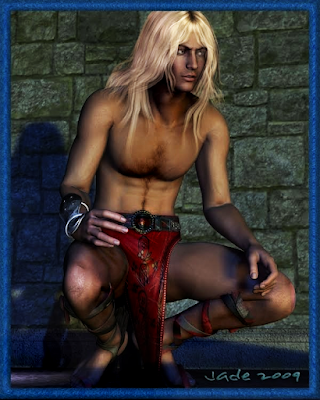
The fantasy barbarian ... or is it a barbarian fantasy? DAZ Studio 3 makes this way too easy. It's tougher figuring out what to paint next than actually doing rhe paintings! For this one, I wanted to stay with the big hunky barbarian -- Conan who? -- from yesterday, but I also wanted to do something different. So Conan got a makeover: blond. And doesn't it suit him?

It was a lot of fun doing these pictures. Lose the bow and quiver from yesterday ... keep the rest of the costume (the strappy sandals from the Horizon Redux set, the kirtle from the Wood God set, and the Evangelique hair. Oh, and the forearm guard from the Horizon Redux set, and the background is still the Backgrounds Made Easy set -- which is a godsend. Worth five times its value, at least to like likes of me, doing this kind of work...

Then, change the kirtle to red, change the hair to pale straw gold, and reset the lights. The hardest part (and it's not exactly hard) is setting the hair to lie properly around the shoulders when the character moves. The hair has to sort of float around as he moves. remember, also, this is a style designed to fit Victoria, not Michael 4, so -- as I explained yesterday -- you can't "fit the hair to the model" at all. You have to fit the model to the hair!


Right now, I'd rather like to have this barbarian meet up with the Vampire Amadeus. Now, who would eat whom alive?! If I get the time later today, I'll set that up, see what happens. Now, do I take Amadeus out of the Itaian Renaissance and plunk him back into the Hyborean Age, or do I have the Barbarian (he needs a name) take a trip on the Tardis and blunder into the Italian Renaissance? Decisions, decisions!

 As a final note, the Amadeus render from the other day have been fully enhanced ... here's my favorite from the original series of renders:


And here's the link to see the whole series of renders:
http://3d-adventures.blogspot.com/2010/01/yaoi-vampire-beauty-beyond-describing.html

Join me again tomorrow for the further adventures...

Jade, 22 January

***Posted by MK: my connection is intermittent, too slow for this. Seriously, guys, I've got dialup speeds. How are you expected to do anything these days, at 1990 dialup speeds?!!!


Wednesday, January 20, 2010

The barbarian archer ... in 3D, of course!


I'm in a kind of "3D barbarian" mood today, so ... mix and match, props and models. Yep, it's still Michael 4! He's wearing his high-rez skin map, and the hairdo is actually intended to for the Victoria 4 model, but if you're smarter than paint, you can get it to fit Mike. Takes a whale of a lot of pushing and pulling -- more about that in a second, in case you want to have a go.

I'm using the "old stone" background from the Backdrops Made easy kit, and the "dirt" floor or ground texture. I've put the kirtle from the Wood God prop set on the barbarian to give the poor man some modicum of modesty (I wonder if barbarians are worried about that?) and the bow and arrow, and the forearm guard, and the strappy sandals, are from the Horizon Redux prop set, which was on special for about half price last week.

The hair ...! It's be Evangelique hairdo ... and it looks better on Michael 4 than it does in Victoria, if you ask me! Getting it to fit is a bear, though. Here's how I did it. There is no way on this planet to fit the hair to the model, so ... you fit the model to the hair! Import the hair and tell it to "fit to none," so that it floats in midair. Then set the x,y,z parameters to 0,0,0. Then, maneuver the Michael 4 model up underneath it, and nudge him up, and up, until his skull is inside the hair. Then use the x,y,z scale parameters to make the hairstyle sit on his head just right. Then, drag the item, in the scene contents list, down to the model's "head" so that it locks in place. Now it'll move with the model, and you can use the Evangelique morphs to swing it around, make it long, short, bangs in and out, wind blasting it -- whatever you need.

So there you are: the Evangelique hair fits Michael 4 now, and if someone tells you it doesn't, tell them they're dead wrong, and tell 'em where you found out how to do it! (Seriously, I wasted more time trying to fit the hair to the model the conventional way than it took to take Michael 4 and punt him head first into the hairstyle, resize the hair, and lock it down. As soon as I gave up trying to make it work "properly," I got a good fit in about three minutes with no grief.)

Getting the strappy sandals to fit was also interesting, because they're from the Horizon Redux prop set, and yet again (!) they're made to fit Victoria. All the cool stuff is made to fit bloody Victoria! Anyway, you can tell them to fit Michael 4, but they don't really ... so you use the morphs to get as close a fit as you can, then you use the x,y,z scale controls to fine-tune it. When you're fitting the sandals to Michael 4, for gawdsakes remember to set LOW HEEL --

The nitwit who designed the Horidzon Redux costume ... it's got to be a teenage boy ... put stiletto high heels on the strappy sandals in which a barbarian archer is going to war, or to hunt! Cheese, can you imagine splodding around a battlefield in four inch high heels?! It only happens in the mind of the teenage male. And Mike 4 looks even more daft wearing them than Victoria looks. Fortunately, there's a LOW HEEL morph to get rid of them.

(The rest of the Horizon Redux set consists of a thong bikini panty, a DDDD size morphing bra, and a tie-on wraparound skirt, plus the bow, arrows, quiver, forearm guards, gauntlets. Marvellous, isn't it, how women can go to war almost naked, while men have to put on ten layers of leathers and armor. Men just never got the hang of how to do that ... like prancing in the muck and sand in high heels. Gals are just so clever, how they manage to do this. I bought the Horizon Redux pack because I wanted the weapons.)

After you're done getting a fit for the hair -- which shouldn't take long now, because you know how!! -- the next bit of fun is fitting the drawn bow into the character's hands. The left hand is easy: it's an auto fit into Michael's OPEN hand. You'll need to close the hand yourself. Then pull the bow to whatever degree you like, and ... then the fun begins, because you have to get the right hand to fit around the bowstring and arrow shaft. It's not easy, but give yourself a good few minutes to get a good pose here.

Last thing: set up some lights. I used two distant lights (one blue-green, one muddy yellow), and three point lights specifically aimed at the ground to bring up the dirt underfoot. Turn ON the shadow type in the distant lights when you're ready to do some renders -- don't turn on the shadows on the point lights, and keep the colors cold and muddy and murky, so they suit the ground.

And then basically swing the model around and render what looks good ... and boy, does he look good! I had fun doing this one -- wound up with five and decided to upload the lot because they all look great!

Jade, 21 January

***Posted by MK: my connection is intermittent, too slow for this. Seriously, guys, I've got dialup speeds. How are you expected to do anything these days, at 1990 dialup speeds?!!!

Tuesday, January 19, 2010

The vampire ... 3D allure

One of those times...

...when I sooo wish I could raytrace!!


The vampire's bedchamber ...! "Invitation from the Vampire," no less...! Amadeus invites you to, uh, stick around and drink a little hundred year old brandy, and maybe see what happens next!

It might not look like it, but these images are the result of an assignment I set myself. Could I take leather and, by changing the settings, turn it into organza -- that silky stuff that's like gossamer. And the answer it, yep, I did it!


Ready for this? The leather pants in this picture, right above, and the flimsy, silky underwear ... they're the same model. The organza is literally transparent, white, lighter than air, just floating around the model. The Leather is, well, leather. I've been wanting to take a crack at this for weeks, and haven't had the opportunity.

Suffice to say, it's all about jiggling the settings in the Surfaces tab. Basically, you drop out the maps, bumps and textures and what have you -- these are the support files that give the model its appearance. If you delete these, all you have left is the shape. Then, set the color to whatever you need, and then fiddle about with the opacity, the glossiness, the reflection and refraction, and ... leather becomes organza. Just the kind of thing an Immortal who learned to love silk and wine and hedonistic self-indulgence would be wearing in his boudoir.

The costume (such as it is, he he he) is actually the leather pants from the Wood God set of props. This is such a cool effect. And you have to admit, the Vampire Amadeus is a beauty. I don't think he'd have to offer twice...

Jade, 20 January

***Posted by MK: my connection is intermittent, too slow for this. Seriously, guys, I've got dialup speeds. How are you expected to do anything these days, at 1990 dialup speeds?!!!


Sunday, January 17, 2010

The 3,000 year old vampire ... beauty beyond describing ... Amadeus himself

One of those times...

...when one wishes...

...soooo wishes....

...that one could raytrace!

Just beauty shots today folks, sorry -- no time to chat! Work has hit me like an avalanche, and it's currently piled up way over my head. So I have to upload and run today, but I will be back tomorrow with more guy candy, and I ought to have the chance to write something coherent then!


For now ... let the images speak for themselves. Beauty ... immortal ... vampire ... Yaoi ... see it any way you prefer. He sure is a lovely sight! And yes, of course I rendered the whole story. I even added a feature or two (!) but I don't have time to upload it and link to it today. I'll get to this tomorrow, hand on the heart.

So join me then, and for now, enjoy!

Jade, 18 January

***Posted by MK: my connection is intermittent, too slow for this. Seriously, guys, I've got dialup speeds. How are you expected to do anything these days, at 1990 dialup speeds?!!!